10 In-Demand AI Skills Without Coding That Pay Well in 2026
AI courses for beginners from scratch are among the most searched topics in India right now. Most people believe that learning AI requires years of programming experience. That is not the case in 2026. Professionals getting hired and paid more are not the ones building AI models from scratch. They are the ones who know how to use AI tools to automate work, generate output, and solve business problems without writing a single line of code.
Whether you’re a beginner with no technical background, a working professional, a student, a freelancer, or a business owner, this blog will help you understand the in-demand AI skills you can learn without any coding knowledge.
Why No-Code AI Is the Most Valuable Skill in 2026
A few years ago, most companies were racing to build their own AI models. That phase is largely over. Today, the focus has shifted to putting existing AI models to work inside business processes to automate tasks, reduce manual effort, and cut decision-making time.
This shift is creating strong demand for people who understand in-demand AI skills at the operational level. Businesses are actively looking for professionals who can connect AI tools to processes, and that is a role that does not require coding knowledge.
These are also the best AI tools for business use cases, where the person running the solution understands both the business problem and the AI capability. That combination is still rare, and that is why it pays well. For professionals thinking about AI skills to avoid layoffs, building no-code AI knowledge is a practical place to start.
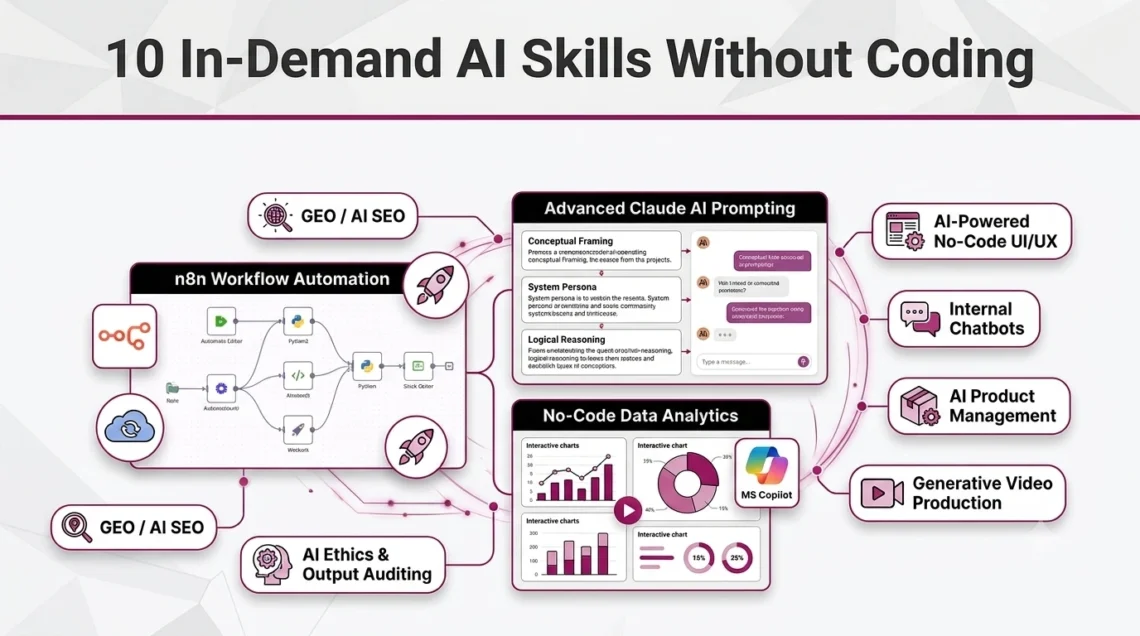
The 10 In-Demand AI Skills Without Coding in 2026
Skill 1: No-Code AI Workflow Automation
This is one of the highest-impact skills a non-technical professional can develop right now. The idea is straightforward: a business process, such as a lead coming in, getting filtered by AI, and an email going out automatically, runs without any human involvement and without any code.
n8n is the tool leading this space in 2026. It handles advanced conditional logic, multi-step branching, and API connections that simpler tools cannot manage, and it does all of this through a visual drag-and-drop interface.
Professionals who understand n8n workflow design are in strong demand across startups, agencies, and midsize companies. Those who want to build automated pipelines that businesses will pay for can explore a structured n8n course for beginners that covers everything from a first workflow to complex multi-node automation with no coding required.
n8n vs. Other Automation Tools:
Zapier and Make (formerly Integromat) are the two most commonly compared alternatives. Zapier is easier to start with but charges per task and limits complex logic in its lower plans. Make offers more flexibility than Zapier but has a steeper learning curve. n8n stands apart because it is open-source, allows self-hosting, and places no hard caps on workflow complexity. For professionals who want to learn n8n automation from scratch and build workflows that go beyond basic triggers and actions, n8n is the more practical long-term choice.
Skill 2: Advanced Conversational and Multimodal Prompting
Most people use AI tools at a surface level by asking basic questions and generating short summaries. However, generic prompt writing is outdated in 2026. A high-income skill lies in conceptual prompting—understanding how to structure mental frameworks, build complex role-based personas, and guide AI models to reason through multi-layered business challenges with consistent, production-grade output.
Claude AI by Anthropic has become the gold standard for professionals doing heavy conceptual work in 2026. Unlike other tools, Claude thrives on structured system instructions, artifact generation, and extended context reasoning. Its ability to parse massive company handbooks, analyze intricate legal contracts, and maintain deep logical consistency across long workflows makes it the preferred engine for high-stakes enterprise tasks.
When professionals shift from “writing prompts” to “designing conceptual AI frameworks,” they unlock a massive career edge. Demand for individuals who can orchestrate these intelligent, context-heavy reasoning structures is exploding across consulting, corporate strategy, marketing, and legal operations. A focused Advanced Claude AI course takes learners beyond basic text generation, training them in advanced conceptual engineering, multimodal data synthesis, and reasoning-heavy business solutions.
Claude AI vs. Other AI Assistants
ChatGPT by OpenAI is the most widely used AI assistant and works well for general tasks. Gemini by Google is tightly connected to Google Workspace and useful for people already working inside that environment. Claude AI by Anthropic is increasingly preferred for tasks that require reading and reasoning over long documents, producing structured business content, and maintaining consistent logic across multi-step prompts. For professionals looking to master Claude AI for business use, particularly in writing, analysis, and decision-support work, Claude holds a clear edge in output quality for complex, context-heavy tasks. Those looking for Claude AI training will find that focused prompting practice is what separates average users from those who can produce reliable, high-quality results.
Skill 3: Generative AI Video and Media Production
Marketing teams that used to spend days producing video ads are now doing it in hours. Generative AI video tools like Sora and Runway Gen-3 allow professionals to create production-quality videos from text scripts with no camera, no editing software, and no video team required.
This skill is particularly valuable for freelancers and content marketers. The ability to use an AI text to video generator to produce short-form content, product demos, and social media videos is already generating consistent freelance income for early adopters.
Skill 4: AI-Powered No-Code Data Analytics
Raw data sitting in Excel sheets has very little value until it is analyzed. AI has made that analysis accessible to anyone. Tools like ChatGPT Advanced Data Analysis and Microsoft Copilot allow professionals to upload spreadsheets and get automatic charts, trend summaries, and anomaly detection without touching a single formula.
No-code data analytics using AI is especially useful for operations, sales, and HR professionals who work with data regularly but have no data science background. The ability to use AI for Excel sheets and produce board-ready insights quickly is a practical skill with immediate on-the-job value.
Skill 5: Custom GPTs and Internal Knowledge Bases
Every company has documents such as SOPs, FAQs, product manuals, and HR policies that employees constantly need to reference. With OpenAI GPT Builder, it is now possible to build a private internal chatbot trained on those documents without any developer involvement.
Professionals who know how to create a custom GPT for internal use are solving a pain point for businesses. A custom chatbot that answers employee questions or handles customer queries using company-specific knowledge is far more useful than a generic AI tool. This skill also ties into the question of how to build a custom AI chatbot without code, something many business owners are actively searching for.
Skill 6: No-Code UI/UX and App Prototyping
Designers and product managers used to depend entirely on developers to bring a concept to life. Tools like v0.dev and Uizard have changed that. With these AI tools for UI/UX design, professionals can describe a product in plain language and get a working visual prototype with full layouts, components, and mobile-responsive structures in minutes.
The ability to generate website design using AI is valuable for freelancers pitching to clients, startup founders testing ideas, and product managers who want to communicate concepts clearly without waiting weeks for a design sprint.
Skill 7: AI Product and Project Management
Not every AI role involves using tools directly. Some of the highest-paying positions are managerial, involving an understanding of which AI tool solves which business problem, evaluating costs, and guiding teams through adoption. AI product manager roles are growing fast, and companies are paying more for managers who understand both business needs and AI tools.
These are practical AI skills for managers, not technical but planned and goal-oriented. Knowing when to automate, what to automate, and how to measure the outcome is something senior professionals can develop without writing code.
Skill 8: AI Ethics, Output Auditing, and Risk Management
AI makes mistakes. It sometimes produces confident-sounding answers that are factually wrong, a problem called hallucination. It can also reflect biases present in its training data. Companies using AI in customer-facing or compliance-sensitive contexts need professionals who can audit outputs and flag risks before they cause damage.
AI risk analyst skills and AI ethics compliance knowledge are becoming formal job roles, particularly in the finance, healthcare, legal, and government sectors. This is a skill that suits detail-oriented professionals from any background.
Skill 9: Generative Engine Optimization (GEO / AI SEO)
Search behavior is changing. Millions of people now get answers directly from ChatGPT, Perplexity, and Google AI Overviews without clicking on any website. Traditional SEO targets Google rankings. Generative Engine Optimization (GEO) targets AI recommendations.
What is Generative Engine Optimization? It is the practice of structuring content so that AI systems cite and recommend it when users ask related questions. A solid AIO SEO strategy in 2026 covers both traditional search and AI visibility, and professionals who understand both are rare and well-compensated.
Skill 10: No-Code AI Customer Support Operations
Customer support is one of the highest-cost departments in most businesses. AI bots can now resolve a large number of support tickets automatically without human agents. Tools like Chatbase and Intercom Fin make it possible to set up smart support bots trained on company content with no coding required.
The ability to design and run an AI customer care bot and manage no-code customer service AI operations is a practical skill that directly saves companies money. Professionals who can set up and manage these systems are valuable to any business with a large customer support volume.
How to Build an AI Portfolio Without Coding
Getting started with AI does not always require paid courses right away. There are free resources available, and for someone exploring the basics, they are a reasonable first step.
Free YouTube Channels and Tutorials
Channels like Traversy Media, Tiff In Tech, and various n8n-specific tutorial creators on YouTube cover beginner-level automation and prompting concepts. For Claude AI, Anthropic’s own documentation and several independent creators post workflow walkthroughs that are easy to follow.
The limitation with free content, though, is real. Most YouTube tutorials cover isolated features rather than complete workflows. There is no feedback loop, no structured progression, and no way to know if the skill being built actually matches what employers or clients expect. Free content also goes outdated fast in the AI space, and finding reliable, current material takes time that most working professionals do not have.
Free Certifications
Google offers free AI and machine learning certificates through its Skillshop and Coursera programs. Microsoft also provides free Azure AI fundamentals paths. These are worth completing for resume credibility, but they are largely theoretical. The hands-on, tool-specific skills that come from building actual workflows are not covered in depth.
Self-Study Path (If Starting Without a Course)
For those who prefer to build knowledge independently before investing in structured training, a practical starting order would be: begin by reading the official n8n documentation and completing the built-in workflow templates to understand how nodes connect. Move on to the Anthropic documentation for Claude to understand prompt structure, context windows, and output formatting. Build two or three small projects, such as a lead-capture automation or a document summarization prompt chain, and document each one with screenshots and a short written explanation of the problem it solved. Post these on LinkedIn with relevant hashtags. This self-study path works, but it takes longer and requires a higher level of self-direction to stay consistent.
Structured Training
For learners who want faster progress and a clearer path from beginner to job-ready, structured training makes a noticeable difference. The n8n automation course covers workflow design from the ground up, moving from basic triggers to complex multi-node pipelines without requiring any coding knowledge. The Advanced Claude AI Course focuses on practical prompting for business tasks, including long-document handling, structured output generation, and multi-step reasoning. Both are designed for non-technical learners and include hands-on projects that can go directly into a portfolio.
Other training options worth considering include Udemy courses on AI automation and prompt engineering, which often go on sale and provide lifetime access. Coursera’s IBM AI Engineering and Deep Learning. AI programs are also respected in the market, though they lean more toward technical tracks than no-code applications.
What These AI Skills Can Do for a Career
Building no-code AI skills does not just add lines to a resume. The practical outcomes tend to show up in fairly specific ways.
Higher Salary Potential: Professionals with practical AI skills are often offered better salaries because they can improve productivity and reduce manual work.
Lower Risk of Layoffs: Learning AI helps you automate repetitive tasks, making your skills more valuable and helping you stay relevant in the workplace.
Easier Career Changes: No-code AI skills are useful across many industries, making it easier to switch roles or explore new career opportunities.
Freelance Opportunities: AI skills can help you earn extra income by offering services such as content creation, workflow automation, and chatbot setup.
Confidence in AI-Driven Workplaces: Understanding AI tools allows you to collaborate more effectively, adapt to new technologies, and grow in AI-powered work environments.
Conclusion
AI is not taking jobs away from people who learn to use it. The professionals losing ground are the ones doing repetitive, manual work that AI can now handle in seconds. The ones gaining ground are the AI operators, people who know how to direct AI tools, build workflows, audit outputs, and deliver results.
The ten skills above do not require a computer science degree. They require curiosity, structured learning, and practice on problems.
The two skills with the clearest career and income path right now are workflow automation with n8n and advanced prompting with Claude AI. Those who want structured, beginner-friendly training can explore the n8n automation course and the Advanced Claude AI training covered in the portfolio section of this blog.
Which skill are you planning to learn first, n8n automation or Claude AI? Drop your answer in the comments.





Best platform for local players in my opinion. It feels reliable and the game selection is just perfect. phperabet
Super impressed with the customer support team, they answered my questions in minutes. The gameplay is fair and rewarding. okadaplaycasino is legit!
Top tier service and a very generous welcome package. It is hard to find a site this consistent these days. I’m really happy with vnbet88vn
This platform makes online betting feel effortless. I love how quick the live updates are and the game selection keeps me coming back. Safe to say this is my go to place now. kr12bet
Best official site I have encountered so far. The customer service is responsive and they help you out with any issues quickly. Trust coklat777resmi for sure.
Login is super quick and the game variety is impressive. I spend most of my weekends on ph333comcasinologin now.
Finally found a platform that feels fair and transparent. The graphics are top notch and the winning streaks are real. Happy with jilibetdonnalynlogin.
I am impressed by the overall quality of the games. It is clear they put a lot of effort into the user experience. Check out krwinum now.
Really loving the variety of games available here. The interface is smooth and I didn’t encounter any lag during my session. Highly recommend phphl888 to everyone
Quick access and no glitches. It is refreshing to find a site that actually prioritizes speed and stability for the players. nog88login
[5999]4999 bet লগইন ও অ্যাপ ডাউনলোড | সেরা অনলাইন স্লট গেম,4999 bet লগইন করে উপভোগ করুন সেরা অনলাইন স্লট গেম। বিকাশ দিয়ে ক্যাসিনো ডিপোজিট করে লাইভ ক্যাসিনো খেলার নিয়ম জানুন এবং আজই অ্যাপ ডাউনলোড করুন। visit: 4999 bet
Superb service and a very welcoming community. I had a small issue with my account but it was sorted in minutes. bangladeshjaya9 is truly professional.
Really impressed with the loading speed and the overall design. It is very intuitive even for beginners. My go-to is pkkk77
The variety of games is insane. There is always something new to explore and the community is pretty chill. Glad I found planetligalogin.
[9757]Johnbet login ph | Legit slot games at payout via Gcash,Gamitin ang johnbet login ph para sa legit slot games gcash. I-download ang app at alamin kung paano maglaro ng baccarat. Mag-sign up na rito! visit: johnbet
Honestly the best user interface I have encountered so far. Everything is easy to find and the bonuses are actually fair. Definitely giving vn888p another go tonight.
Everything about this site is professional. From the login process to the game selection, it is all top notch. Try jiligocasinologin
[8278]1wingames login এবং অ্যাপ ডাউনলোড | বিকাশ অনলাইন ক্যাসিনো,1wingames login করুন এবং অ্যাপ ডাউনলোড করে আসল স্লট গেম কিভাবে খেলবেন তা জানুন। বিকাশ দিয়ে অনলাইন ক্যাসিনো গেম শুরু করতে আজই যোগ দিন। visit: 1wingames
Great experience so far. The customer support is actually helpful and the games are very fair. Give krwin24 a try, you won’t regret it.
The variety of games here is amazing. I spent hours playing and won a decent amount. Definitely check out phjiliasia77.